


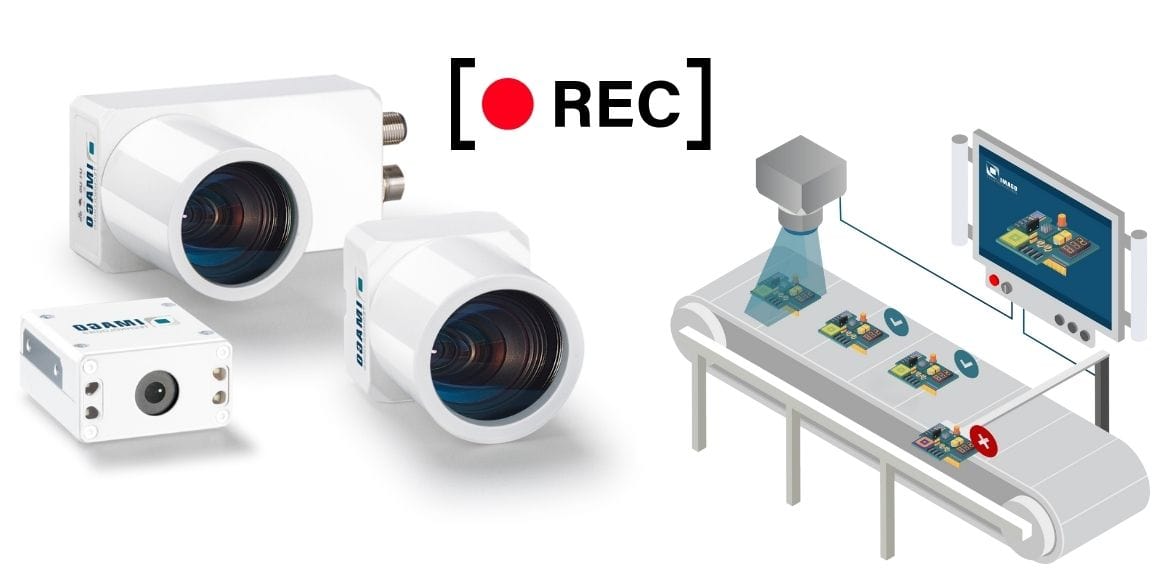


New software functionalities for the Industrial Dashcam significantly expand the application scope of industrial cameras for incident analysis far beyond simple trigger-based video recording. While industrial dashcams have traditionally been used mainly for retrospective analysis of faults or downtime, new trigger and image processing functions now enable targeted, context-based event capture. This provides production managers, automation engineers, and quality managers with a tool that creates transparency, makes root causes visible, and objectively documents processes. This guide explains the technical foundations, the new functionalities, and their concrete benefits in everyday industrial use.
Quick Overview
- IMAGO Industrial Dashcams – robust camera families for monitoring, analysis, and documentation directly in production
- Event-based video recording – videos are stored only when a relevant event actually occurs
- New image processing triggers – software independently detects quality and process deviations in the camera image
- ViewIT as the central software platform – a unified environment for configuration, visualization, and vision functions
- Greater process transparency – improved traceability of errors, downtime, and critical situations
- The IMAGO Industrial Dashcam Family at a Glance
- Event-Based Video Recording – Existing Functionality
- New Software Functionalities for the Industrial Dashcam
- ViewIT as the Central Software Foundation of the Industrial Dashcam
- Added Value of the New Software Functionalities in Everyday Industrial Use
- Conclusion – Why New Software Functionalities Enhance the Industrial Dashcam
- FAQs on New Software Functionalities for the Industrial Dashcam
The IMAGO Industrial Dashcam Family at a Glance
Industrial Dashcams are designed for event-based video recording in production and logistics environments. They are used wherever processes need to be documented, faults analyzed, or machine states traced.
Industrial Dashcams in Use
The Industrial Dashcam records critical events in a targeted, trigger-based manner, reduces data volumes, and enables fast root-cause analysis. Downtime can be shortened, and service and commissioning processes accelerated.
Event-Based Video Recording – Existing Functionality
In industrial environments, continuous video recording is neither efficient nor practical. Large volumes of data without a specific reference complicate analysis and increase storage requirements. Event-based video recording therefore deliberately focuses on relevant situations in which later evaluation provides real added value.
External Triggers (External Event)
With external triggers, video recording is initiated by a digital signal. This signal typically originates from a machine controller, a sensor, or a higher-level automation system. The advantage lies in the clear linkage to defined process states, such as a machine stop, an error message, or the absence of an expected signal.
In practice, this allows reproducible documentation of exactly those moments that are critical from a production perspective. Operators and maintenance personnel can later precisely trace what was visible in the process immediately before, during, and after the event.
Automatic Triggers Based on Image Change (Auto Event)
With the Auto Event, the camera continuously analyzes the image content of a defined region. As soon as this content changes beyond a configurable threshold, a recording is triggered. Sensitivity can be freely parameterized, allowing the function to be adapted to different applications.
Typical use cases include detecting movement or the sudden appearance of unexpected objects in the field of view. Unlike classic surveillance cameras, this function is specifically designed for industrial processes and can be precisely limited to relevant image areas.


New Software Functionalities for the Industrial Dashcam
With the new functionalities, the Industrial Dashcam evolves from a reactive recording system into an active analysis tool. At the core is the use of image processing as a trigger for video events, enabling the camera to independently detect process and quality deviations.
Image-Processing-Based Triggers – Intelligent Event Detection
The new function allows video recording to be triggered directly by image processing logic. The vision functions available in the software can be freely programmed by experienced users. An event is no longer generated solely by a signal or movement, but by an evaluation of image content.
Specifically, image processing can detect faulty codes, incorrect components, or quality defects. Geometric deviations such as a bent pin or a defective seal can also be defined as trigger criteria. The Dashcam then records exactly the moment when the defect occurs or becomes visible – including context before and after the event.
Combining Multiple Trigger Sources for Maximum Process Reliability
All available trigger types can be activated in parallel. External Event, Auto Event, and Image Processing do not operate exclusively, but complement each other. This creates robust fallback scenarios that are particularly relevant in safety- or quality-critical processes.
A typical example is the combination of a digital input and image processing. If no image-processing event is detected, a recording can still be triggered via an external signal. Conversely, image processing can also trigger recording even if no control signal is present. This redundancy significantly increases the reliability of event capture.
ViewIT
With ViewIT, Imago Technologies offers software for image acquisition, data input and output, parameterization, GUI, and machine integration.
ViewIT as the Central Software Foundation of the Industrial Dashcam
All Industrial Dashcam functionalities are fully integrated into the ViewIT user interface. ViewIT forms IMAGO’s proprietary central software foundation for image acquisition, I/O, parameterization, user interface, and machine integration, and thus plays a key role in the overall system.
What Is ViewIT and What Is It Used For?
ViewIT simplifies entry into industrial image processing and significantly accelerates development processes. Typical applications already integrated in ViewIT include blob analysis, optical character recognition (OCR), code reading, and filter logic – all usable without in-depth programming.

For the Industrial Dashcam, this means that image-processing triggers are not isolated functions, but part of a comprehensive vision concept. The Dashcam is thus embedded into existing inspection and analysis processes.
Two Operating Concepts for Different User Profiles
The additional Dashcam functionality is directly integrated into the existing ViewIT user interface and is aimed at experienced users with image processing expertise. At the same time, a separate web interface is available that is deliberately reduced to the Dashcam-relevant functions.
This simplified interface includes a live view of the camera image, adjustment of key camera parameters, and selection of the recording event. Users without vision expertise can therefore operate and configure Dashcams without having to deal with complex image processing details.

Added Value of the New Software Functionalities in Everyday Industrial Use
The practical benefit of the new functionalities is most evident in daily operation. Events are not only recorded, but also contextually classified, making analysis significantly more efficient. New trigger and image processing functions ensure that exactly those process moments are documented that are truly relevant for root-cause analysis, quality assurance, or service interventions.
For quality managers, this means objective documentation of defects at the moment they occur. Production managers benefit from faster root-cause analysis in the event of downtime or deviations. At the same time, operators and maintenance staff are relieved, as fewer manual interventions and follow-up questions are required. The Dashcam thus becomes an integral component of transparent, data-driven processes.
Increasing Productivity
Scalable image processing solutions adapt to your processes, capture events in a targeted manner, and ensure transparency and reliable process optimization in industrial operations.
Conclusion – Why New Software Functionalities Enhance the Industrial Dashcam
New software functionalities for the Industrial Dashcam shift the focus from pure video recording to intelligent process documentation. Image-processing-based triggers create context instead of raw data. Companies gain more precise insights into their operations without having to install additional sensors or complex systems.
The close integration into ViewIT ensures future-proofing and expandability. This makes the Industrial Dashcam a scalable tool that grows with the requirements of modern production environments and delivers long-term added value.
FAQs on New Software Functionalities for the Industrial Dashcam
Which applications are image-processing-based triggers particularly suitable for?
Image-processing-based triggers are particularly suitable for quality- and process-critical applications where not every movement, but only content-relevant deviations should be documented. Typical examples include faulty codes, incorrect components, or detected quality defects. Targeted triggering reduces data volumes and increases the informational value of recordings.
Do I need image processing expertise to use the new functionalities?
Basic functions can be used without image processing expertise thanks to the simplified web interface. However, experience and technical knowledge are required to freely program complex image-processing triggers. Companies can therefore decide how deeply they want to engage with vision logic.
Can existing Dashcams be expanded via software?
Existing Industrial Dashcams can benefit from the new functionalities through software extensions, provided the hardware is compatible. This allows existing installations to be upgraded without replacing the camera, protecting investments and enabling gradual functional expansion.